
Best overall Amazon Seller Central MCP tool in 2026: Kuudo, for teams that need Seller Central, Vendor Central, Ads, and AMC connected in one server. Best for engineering teams building their own endpoint set: a self-hosted SP-API MCP server. Best for a single urgent report with zero setup: a browser automation agent driving the Seller Central UI directly.
- Kuudo is the best overall amazon seller central mcp tool in 2026 for full Ads, AMC, and Vendor Central coverage.
- A self-hosted SP-API MCP server wins for engineering teams who need only a narrow slice of Seller Central data.
- Browser automation agents skip API setup but leave no audit trail and break when Amazon changes the UI.
- Manual CSV exports into ChatGPT or Claude work for one-off ASIN checks, not recurring operations.
Why this matters
MCP (Model Context Protocol) lets an AI client call a tool directly instead of you pasting a report into a chat window. In 2026, that means an agent inside Claude, ChatGPT, or Cursor can pull a Business Report, check FBA inventory, or read an AMC audience size without five open tabs.
The connector doing that work has to live somewhere: your own cloud, a vendor's shared server, or a browser session logged into Seller Central. That placement decision is the real fork in this category, not the chat interface on top of it.
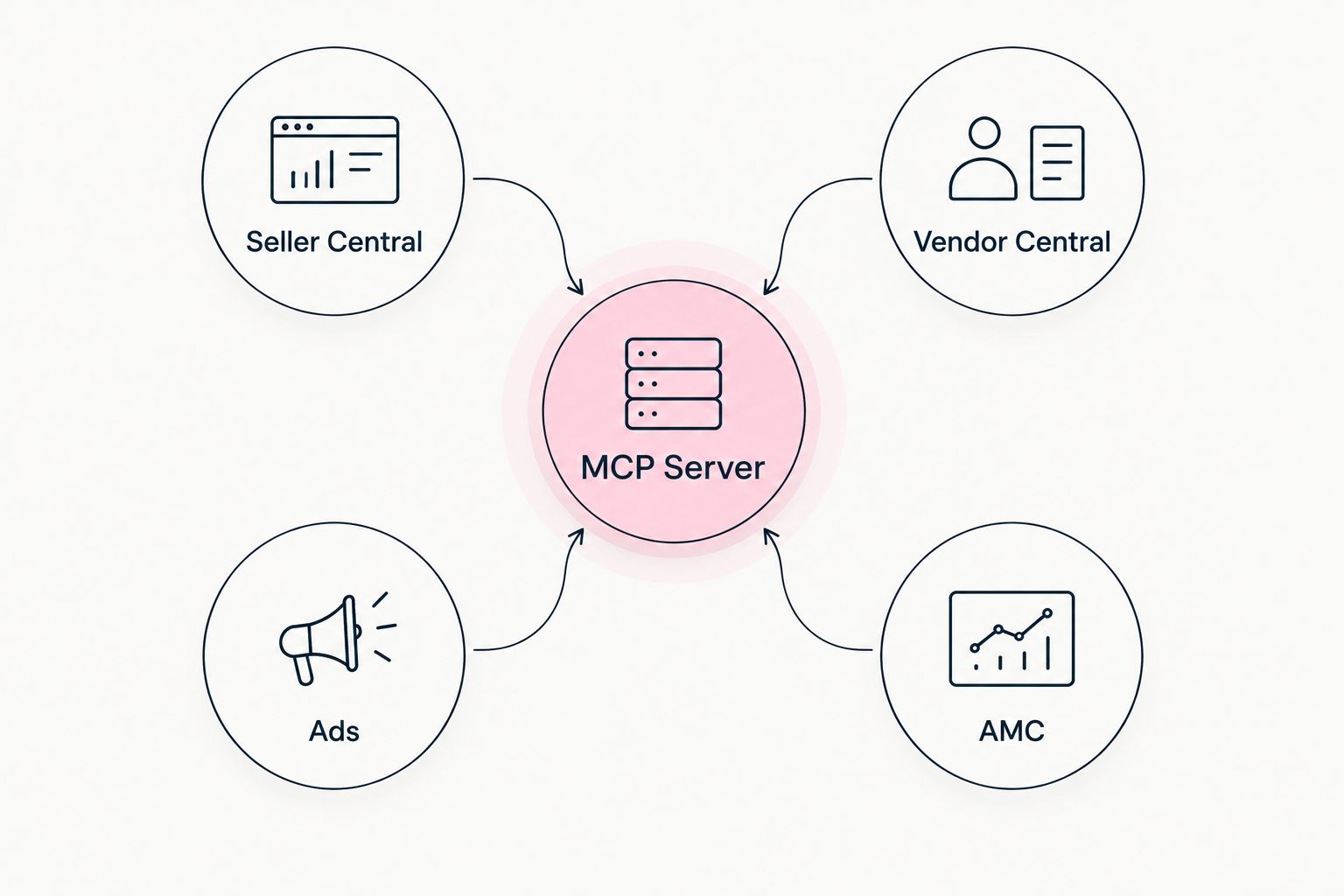
Kuudo runs the connector in your own cloud and bridges Seller Central, Vendor Central, Ads, and AMC through one MCP endpoint. That's the reference point the rest of this list compares against.
What makes the best Amazon Seller Central MCP tool
- Direct SP-API coverage for Orders, Reports, Listings Items, and FBA Inventory, not screen scraping
- Own-cloud or private hosting so Seller Central, Ads, and AMC data never sits on a shared third-party server
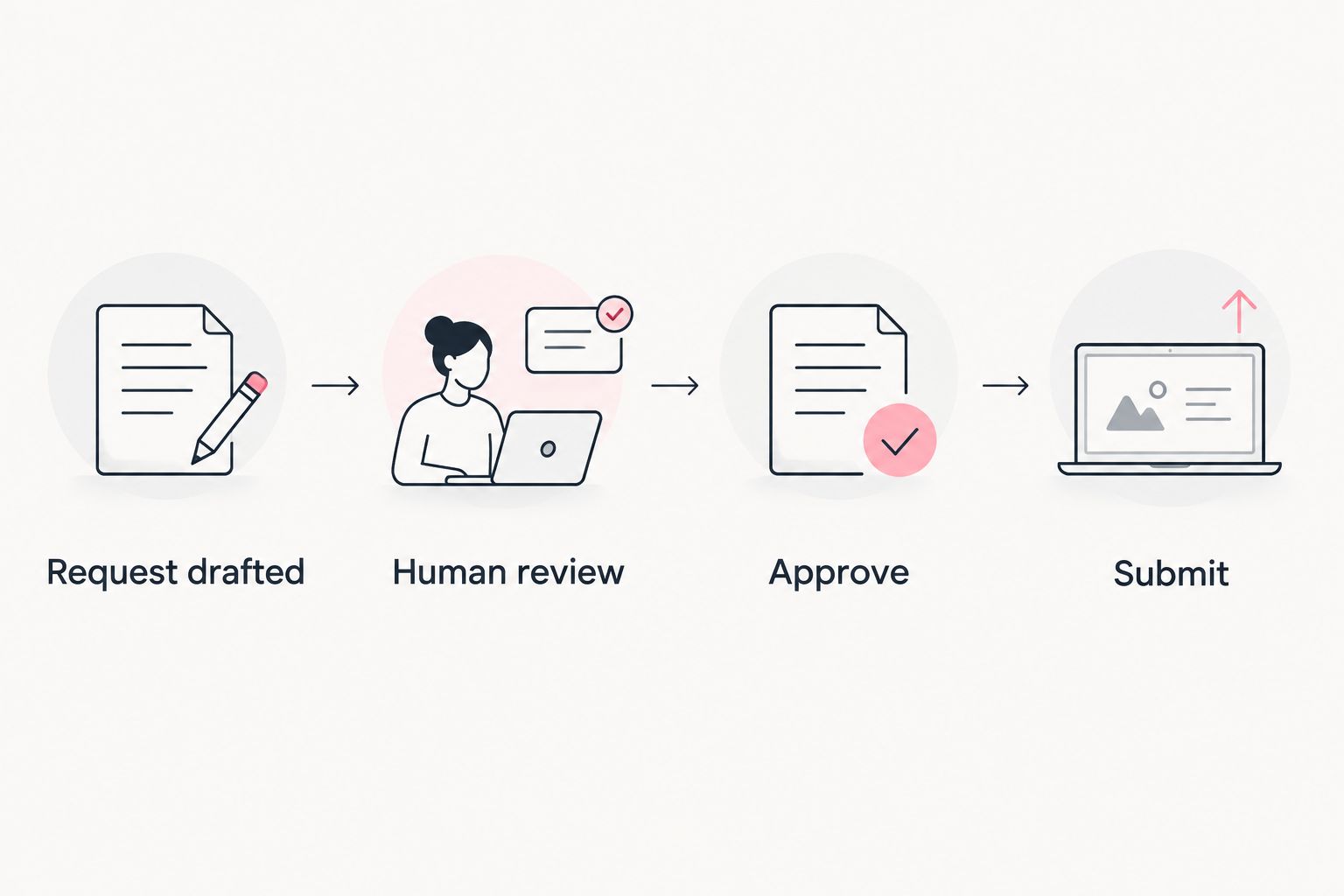
- Human approval gates before any write action: price changes, listing edits, ad bid changes
- Cross-account bridge that joins Seller Central data with Ads and AMC without manual CSV exports
- Native MCP transport so it works inside the AI client you already run, not a separate app
- Run logging for every read and write call, so you can audit what the agent actually did
Amazon Seller Central MCP tools at a glance
| Tool | Best for | Standout feature | Key limitation |
|---|---|---|---|
| Kuudo | Multi-account brands and agencies running Ads, AMC, and Seller Central from one AI client | Single MCP server bridging Seller Central, Vendor Central, Ads, and AMC | Setup requires OAuth credentials from every connected Amazon account |
| Self-hosted SP-API MCP server | Engineering teams that want to build and control every endpoint | Full control over exactly which SP-API operations are exposed | No Ads or AMC bridge without a separate build |
| Browser automation agent | A single urgent task with no API setup | Works the same day, no OAuth registration | Breaks when Amazon changes the UI; no true tool calls |
| Manual export into ChatGPT or Claude | Read-only research on one ASIN | Zero setup, nothing leaves your machine until you paste it | No live data, no write actions, doesn't scale across ASINs |
1. Kuudo: best Amazon Seller Central MCP tool for unifying Ads, AMC, Vendor Central, and Seller Central
Kuudo connects Amazon Ads, AMC, Seller Central, and Vendor Central data and tools into AI clients like ChatGPT, Claude, and Cursor. It runs in your own cloud, so the connector between your Amazon accounts and your AI client is private and yours, not shared vendor infrastructure.
Write actions, price changes, bid adjustments, listing edits, sit behind a human approval step before anything submits to Amazon.
Kuudo pros:
- One MCP server for Seller Central, Vendor Central, Ads, and AMC instead of four separate connectors
- Runs in your own cloud, keeping the data and the moat you build with it private
- Human approval gate on write actions, with the exact payload visible before submission
Kuudo cons:
- Setup requires API credentials and OAuth from each connected Amazon account before the first query
- More than you need if the only job is pulling a single Seller Central report
Best for: multi-account brands and agencies running advertising and Seller Central operations from one AI client.
Verdict: Buy.
2. Self-hosted SP-API MCP server: best for engineering teams building their own endpoint set
A team with SP-API experience can wrap specific operations, Orders, Reports, Catalog Items, in a homegrown MCP server hosted on its own infrastructure. This is a real, working path in 2026, and plenty of engineering-heavy sellers run it.
Self-hosted SP-API MCP server pros:
- Full control over exactly which endpoints get exposed to the AI client
- No dependency on a third-party product roadmap
Self-hosted SP-API MCP server cons:
- No Ads or AMC bridge unless you build it separately
- LWA token refresh, rate-limit handling, and retry logic are your team's responsibility
- No built-in human-approval layer unless someone writes it
Best for: engineering teams with SP-API experience who only need a narrow slice of Seller Central data.
Verdict: Hold — worth it only with engineering bandwidth to maintain it.
3. Browser automation agent: best for a single urgent task with no API setup
An AI agent can drive a browser session logged into Seller Central, clicking through reports and listing pages instead of calling an API. No registration, no OAuth, running the same day.
Browser automation agent pros:
- Nothing to register with Amazon before the first run
- Useful for a one-time pull, like an inventory check before a call
Browser automation agent cons:
- Breaks whenever Amazon changes the Seller Central UI
- Not a true MCP tool call, just a simulated click sequence
- No audit trail of what the agent actually did on the page
“If your AI agent can price a listing but you can't see the payload before it submits, you don't have a tool. You have a liability.”
Best for: a single urgent task, like pulling one report before a meeting.
Verdict: Wait — fine once, not a workflow.
4. Manual export into ChatGPT or Claude: best for read-only baseline research
Download a CSV or report from Seller Central and paste or upload it into a chat. This is where most sellers start in 2026, and it's still the right call for a narrow question.
Manual export pros:
- Zero setup, no credentials, no approval step needed
- Nothing leaves your machine until you choose to paste it
Manual export cons:
- No live data; the file is stale the moment you export it
- No write actions, ever
- Doesn't scale past a handful of ASINs or one-time questions
Best for: a founder checking one ASIN's numbers before a call, not running operations.
Verdict: Skip for anything recurring.
How we ranked
Each tool was measured against the same six criteria: direct SP-API coverage, private or own-cloud hosting, human approval gates on writes, a cross-account bridge to Ads and AMC, native MCP support inside the AI client you already use, and run logging for every call. Kuudo cleared all six; the other three approaches trade off one or more of them for lower setup cost.
See Kuudo's MCP server
Connect Seller Central, Vendor Central, Ads, and AMC into your AI client.
Which Amazon Seller Central MCP tool should you choose in 2026?
If you run Ads, AMC audiences, and Seller Central operations across more than one account, Kuudo is the default pick in 2026 — one MCP server, your own cloud, human approval on writes. If you have engineering bandwidth and only need two or three SP-API endpoints, a self-hosted server holds up fine. A browser automation agent covers a one-off report. Manual exports into ChatGPT or Claude are the right call only for a single ASIN check, never for recurring operations.
FAQ
What is an Amazon Seller Central MCP server?
It's a connector, running on the Model Context Protocol, that lets an AI client like Claude or ChatGPT call Seller Central data and tools directly instead of you exporting reports manually. In 2026 the strongest versions also bridge Ads, AMC, and Vendor Central.
Is Kuudo better than a self-hosted SP-API MCP server?
Kuudo covers Seller Central, Vendor Central, Ads, and AMC in one connector running in your own cloud, while a self-hosted server only covers what your team builds and maintains. The self-hosted route wins if you only need a narrow slice of SP-API and have engineering time to keep it running.
Can an AI agent make price changes on Amazon Seller Central?
Yes, if the MCP tool exposes a write operation for pricing, but that action should sit behind a human approval step showing the exact payload before it submits. A tool without that gate is a liability, not a workflow.
Does browser automation count as an MCP tool for Seller Central?
No. Browser automation simulates clicks in the Seller Central UI rather than making a true MCP tool call, so it breaks whenever Amazon changes the interface and leaves no audit trail of what happened.
How much does an Amazon Seller Central MCP tool cost?
Cost varies by provider and account count; check current plans directly on the vendor's site rather than relying on a fixed figure, since pricing structures change.
Can one MCP server connect Ads, AMC, and Seller Central together?
Yes. Kuudo is built specifically to bridge Amazon Ads, AMC, Seller Central, and Vendor Central through a single MCP server, so an agent can join ad performance with Seller Central inventory without manual CSV exports.
Is it safe to give an AI client write access to Seller Central?
It's safer with a human approval gate in front of every write action and a run log recording what the agent read and changed. Without those two controls, write access to Seller Central is a real operational risk.
One last thing
Amazon Ads enforces a minimum audience size before a DSP activation from AMC will actually run — a floor near 2,000 users, with a 24 to 36 hour lag before the segment goes live. Any MCP tool that submits an AMC audience without checking seed size against that floor first will build audiences that never activate. Check for that seed-size step before you trust any tool's AMC output in 2026.